EAS Security
 EAS Gate
 Security Tag
 EAS Accessories
 Gadgets
 Convex Mirror
 Road Barrier
 Burglar Alarm
 Calling System
Keeping School Vehicle Information Organized with eBiddyaPro
November 09, 2026
Keeping School Vehicle Information Organized with eBiddyaPro
A school administrator receives a call about a transport arrangement. The caller asks which vehicle will operate, how many seats it has, and whether its recorded documents are current. One employee checks a spreadsheet, another searches a paper file, and the transport coordinator refers to the vehicle by a nickname that nobody else recognizes.
These difficulties often begin with inconsistent basic records. Before a school can coordinate routes, drivers, stops, or student transport assignments, it needs a clear directory of the vehicles involved.
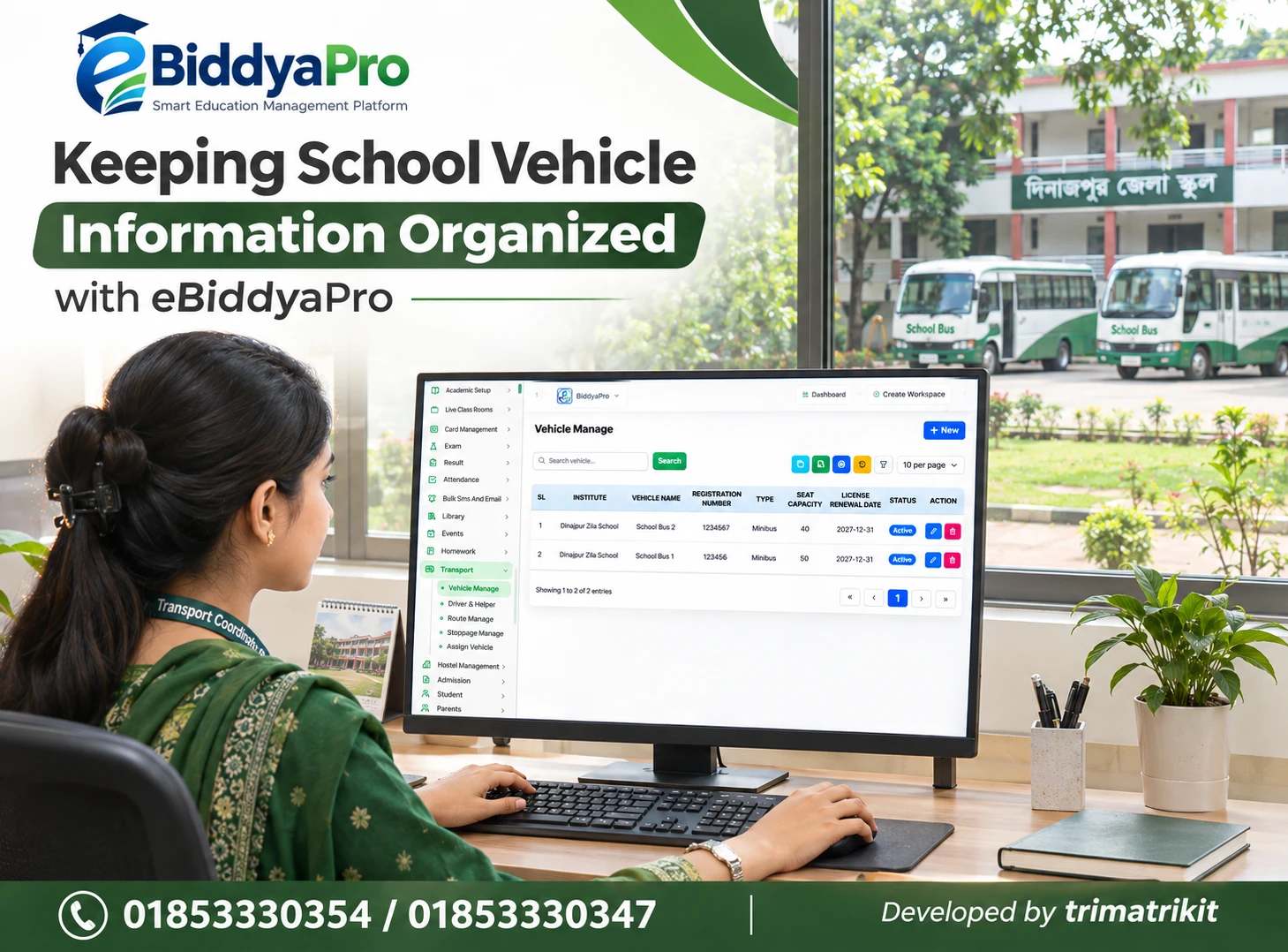
eBiddyaPro’s Vehicle Manage screen provides a starting point for organizing this information. The screenshot supplied for this guide shows vehicle names, registration numbers, types, seat capacities, license renewal dates, institutional associations, and status indicators.
This article explains how Bangladesh schools can approach those records, maintain accurate information, and evaluate the relationship between the visible vehicle directory and wider transport administration. It also distinguishes information stored in software from verified documents and operational decisions.
What Vehicle Manage Means in eBiddyaPro
Vehicle Manage can be understood as the area for recording the identity and basic characteristics of vehicles associated with an institution. In the supplied screenshot, each row represents a vehicle record.
A consistent directory helps administrators identify a vehicle without depending on informal descriptions such as “the large bus” or “the morning van.” It also gives staff a common reference when discussing transport arrangements.
However, the vehicle list alone does not demonstrate live tracking, automatic route planning, maintenance scheduling, or student boarding records. Those capabilities require separate verification. An institution should assess the functions it actually needs rather than assume that every transport feature is included.
Why Vehicle Information Matters for Bangladesh Schools
School transport arrangements can differ significantly between institutions. A school may operate its own vehicles, use contracted transport, or combine both arrangements. Some institutions coordinate several campuses, while others have a single vehicle serving a limited area.
These differences affect the information administrators need. The person reviewing a contracted vehicle may need to confirm its identity against an agreement, while a transport coordinator may need a dependable record of its seat capacity.
For an eBiddyaPro implementation, the useful starting point is the school’s actual transport process. Document which vehicles are used, who verifies their details, and which records staff currently struggle to find.
Understand the Fields Visible on the Screen
The supplied Vehicle Manage screen displays Institution, Vehicle Name, Registration Number, Type, Seat Capacity, License Renewal Date, Status, and Action columns. It also shows a New button, search controls, pagination, and export-related icons.
These visible elements support a discussion about maintaining a vehicle directory. They do not establish every field available in the creation form or the behaviour of each control.
During an eBiddyaPro demonstration, open a record and inspect how information is entered and saved. Test the required field formats and confirm whether users see all institutional records or only those within their permissions.
Associate Vehicles with the Correct Institution
The institution field provides organizational context. This matters when an administrative team manages more than one educational institution or works within a shared software environment.
Before entering vehicle records, agree on the official institution names and the staff authorized to select them. Incorrect associations can make a vehicle appear in the wrong administrative list.
In eBiddyaPro, test whether institution selection affects other transport functions. Also confirm how a vehicle serving more than one campus should be represented. The supplied screenshot does not display a branch column, so branch-specific behaviour should be demonstrated rather than inferred.
Establish Consistent Vehicle Names
Vehicle names should be recognizable and stable. “School Bus 1” may work well if the institution consistently uses that name in its transport records.
Avoid changing names casually whenever a vehicle changes routes. A vehicle’s identity and its current assignment are different pieces of information. Mixing them can make historical discussions confusing.
For eBiddyaPro, choose names that staff can match to actual vehicles and supporting documents. If the institution uses a fleet code, confirm whether it can be recorded appropriately. Do not assume that a separate internal-code field exists without inspecting the form.
Record Registration Numbers Accurately
A registration number helps distinguish the physical vehicle from its administrative nickname. Staff should enter the complete identifier from the relevant document rather than rely on a remembered number.
The supplied screenshot contains short registration values. These demonstrate the field but should not be treated as a recommended format for actual Bangladesh vehicle records.
When testing eBiddyaPro, verify whether the form accepts the full registration format the institution uses, including relevant letters, spaces, or punctuation. Check how the value appears in searches and exports. A consistent entry rule helps staff avoid treating minor formatting differences as separate vehicles.
Keep Vehicle Type Consistent with Verified Information
The Type column describes the recorded vehicle category. The school should use a consistent classification that corresponds to the vehicle and its supporting information.
A label entered in software is not an independent technical assessment. If the vehicle type appears inconsistent with other recorded characteristics, staff should verify the source information before relying on it.
In eBiddyaPro, inspect the available type options and whether they meet institutional requirements. Avoid selecting an approximate category simply to finish data entry. Ask how unsupported categories should be handled and whether configuration changes are possible.
Verify Seat Capacity Before Using It for Planning
Seat capacity is useful for initial transport planning, but its meaning must be clear. The school should establish whether the recorded figure includes the driver or other staff and how it relates to verified vehicle information.
Do not enter a larger number merely because additional students are expected to travel. Capacity records should reflect the approved source information, not an informal target.
For eBiddyaPro, demonstrate how capacity is stored and whether any assignment process uses it. The presence of a Seat Capacity column does not prove that the system automatically prevents over-allocation. Any required capacity control should be tested separately.
Clarify the Meaning of License Renewal Date
The supplied screen includes a License Renewal Date field. Before using it, the institution should ask which document the field is intended to represent.
A vehicle-related date, a driver’s license expiry, a fitness document, and another renewal requirement are not interchangeable. BRTA’s published services distinguish vehicle fitness and tax-token processes, while its service portal also provides driving-license services.
This distinction matters when configuring eBiddyaPro. Do not use one date as a substitute for every document deadline. Confirm the intended field definition and maintain any additional required records through an appropriate, verified process.
Separate Document Recording from Document Verification
A date stored in software reflects the information entered by a user. It does not independently prove that a document is authentic, current, or applicable to the intended vehicle.
The institution should identify who checks original or authorized source documents and who updates the software after verification. Where documents are maintained elsewhere, staff need a reliable way to locate them.
In eBiddyaPro, ask whether attachments or document references are supported if they are required. Do not assume automatic BRTA verification or document renewal integration from the presence of a date field.
Understand What Active Status Controls
The screenshot shows an Active status for the sample vehicles. The school should establish what that status means within its configuration.
An Active record may be available for administrative use, but it should not automatically be interpreted as evidence that the vehicle is ready for a particular journey. Readiness involves information beyond the directory label.
Ask the eBiddyaPro team what happens when a vehicle is made inactive. Confirm whether existing assignments remain visible and whether future selection changes. These details matter when a vehicle is temporarily unavailable, replaced, or removed from the school’s transport arrangements.
Keep Vehicle Records Separate from Route Records
The supplied Transport menu shows Vehicle Manage alongside Driver & Helper, Route Manage, Stoppage Manage, and Assign Vehicle. These labels indicate separate administrative areas.
A vehicle record identifies the transport asset. A route describes an intended service path, while stops and personnel concern other parts of the operation.
Their relationships should be demonstrated in eBiddyaPro. Ask how a vehicle is selected for an assignment and what happens if its details later change. A visible route menu does not establish automatic scheduling, conflict detection, or optimization.
Verify Driver and Helper Information Independently
The vehicle directory does not identify the person who will drive on a particular day. Driver and helper records require separate attention.
An institution should know who maintains personnel details and how current assignments are confirmed. A familiar driver’s name should not replace verification of the vehicle actually being used.
For eBiddyaPro, demonstrate any required relationship between vehicles, drivers, helpers, and assignments. Confirm whether substitutions are supported and how staff identify the current arrangement. Avoid treating a permanent vehicle record as a complete record of daily transport responsibility.
Search Before Creating Another Vehicle
Searching existing records can reduce accidental duplication. Staff should look for the vehicle name and registration identifier before using the New button.
However, the search field’s scope needs testing. It may search particular columns rather than every value visible in the list.
In eBiddyaPro, use realistic examples to establish what can be found. If a record is missing, check pagination, institutional context, and permissions before creating another entry. A vehicle may already exist outside the currently displayed results. Duplicate records can later lead to conflicting capacity, status, or renewal information.
Control Important Edits
The supplied screen shows an edit icon, but the institution should distinguish routine corrections from significant changes. Correcting a spelling mistake is different from replacing the registration number associated with a record.
Where a physical vehicle is replaced, staff should confirm whether a new record is appropriate. Reusing an old record may make earlier assignments difficult to interpret.
Ask how eBiddyaPro manages change permissions and whether history is available. If detailed change history is not supported, establish an approved administrative method for recording significant updates and their reasons.
Treat Deletion Carefully
A delete icon does not establish whether a vehicle can be removed safely from every situation. Other records may depend on its identity.
Before deleting, determine whether the vehicle has historical assignments or information the institution needs to retain. Deactivation may be more appropriate in some circumstances, depending on the system’s behaviour.
Request an eBiddyaPro demonstration showing confirmations, restrictions, and the effect on related records. Staff should understand the approved process before using deletion during routine housekeeping.
Review Exported Vehicle Lists
Export-related controls can help with administrative review and handover. Their usefulness depends on the output containing the correct scope and preserving information accurately.
Test whether eBiddyaPro exports the current page, selected search results, or a wider list. Compare registration identifiers, capacity values, renewal dates, and status labels with the screen.
A spreadsheet application may alter formatting if it interprets identifiers as numbers or dates incorrectly. Review the exported file before sharing it. Give distributed copies a clear preparation date so staff can distinguish them from the current system record.
Do Not Assume Renewal Alerts Are Automatic
A renewal date can support administrative planning, but it does not establish that the software sends reminders.
If the institution needs advance notifications, demonstrate the required behaviour. Confirm the timing, recipient, delivery channel, and what happens after the recorded date changes.
For eBiddyaPro, distinguish a visible date from an active reminder workflow. Until a required alert is verified, assign responsibility for reviewing upcoming dates through the institution’s approved process. Avoid relying on a notification that has never been tested.
Distinguish Vehicle Management from Live Tracking
A vehicle directory and GPS tracking answer different questions. The directory identifies a vehicle and records its characteristics; live tracking concerns location information from a supported source.
The supplied screen does not demonstrate GPS integration, journey history, estimated arrival times, or guardian tracking access.
If these capabilities are required, discuss them explicitly during the eBiddyaPro evaluation. Ask about hardware, connectivity, permissions, costs, and the accuracy of the displayed information. Do not present standard Vehicle Manage records as evidence of real-time tracking.
Maintain Records Through an Assigned Owner
A useful directory needs clear responsibility. The institution should designate someone to coordinate verification and updates, even when several employees use the information.
Review records when vehicles are introduced, replaced, withdrawn, or associated with changed documents. Planned reviews before a new academic term can also identify outdated information.
eBiddyaPro can provide the administrative location for the records, but it does not remove the need to verify changes. A clear handover process helps prevent the directory from becoming dependent on one employee’s memory.
Evaluate a Complete Workflow
A demonstration should follow the school’s actual work. Create a sample vehicle, verify its identifying details, search for it, edit an authorized field, and inspect an export.
Then test any required relationship with routes, personnel, or assignments. Include a temporarily unavailable vehicle and a replacement scenario.
The published eBiddyaPro practical guide recommends evaluating complete workflows and confirming included modules, configuration, integrations, and support terms. This is a useful approach for transport administration as well.
A Practical School Example
Consider a fictional school using two vehicles. Staff currently refer to them by route names, and document information is maintained separately.
The school establishes consistent vehicle names in eBiddyaPro and verifies registration identifiers, type, capacity, and the intended renewal field. Authorized staff test searches and review the resulting directory.
When one vehicle becomes unavailable, the transport coordinator follows the approved replacement process and verifies related assignments. This example illustrates organized records; it does not establish automatic capacity enforcement, renewal verification, or live tracking.
Frequently Asked Questions
1. What is Vehicle Manage in eBiddyaPro?
It is the area shown for maintaining basic school vehicle information, including identity, type, capacity, renewal date, and status. Additional operational functions require separate verification.
2. Which institutions may need it?
Schools, colleges, and madrasas coordinating transport may benefit from a consistent directory. Their required setup depends on the vehicles and administrative processes involved.
3. Can several vehicles be recorded?
The supplied list shows multiple records. Confirm any package limits, permissions, and institutional requirements before planning a wider rollout.
4. Why use both a name and registration number?
The name provides a recognizable internal reference, while the registration identifier distinguishes the physical vehicle. Both should remain consistent with the institution’s verified records.
5. Can complete Bangladesh registration formats be entered?
Test the creation form using the institution’s actual format. Confirm support for relevant letters, spaces, punctuation, and display requirements before importing records.
6. What does vehicle type mean?
It is the recorded classification shown in the list. Verify available options and ensure the selected value corresponds to the vehicle’s supporting information.
7. Does seat capacity show current passengers?
No. A capacity value describes a recorded characteristic. Current passenger numbers or student assignments require separate information and may involve other functions.
8. Does eBiddyaPro prevent over-allocation?
The screenshot does not establish that capability. Demonstrate capacity checks in the relevant assignment workflow if the institution requires them.
9. What does License Renewal Date refer to?
Its intended meaning should be clarified with the implementation team. Do not assume it represents every vehicle document or the driver’s license.
10. Are renewal reminders automatic?
A date field alone does not prove that reminders operate. Verify notification timing, recipients, channels, and related costs separately.
11. Does Active mean the vehicle is ready to travel?
Not necessarily. Confirm the software definition. An administrative status should not replace the institution’s separate readiness and document-verification procedures.
12. Can inactive vehicles remain in historical records?
Ask for a demonstration of that behaviour. Confirm how deactivation affects past information and future selection in related workflows.
13. Is route management the same as vehicle management?
No. Vehicle records identify assets, while routes concern service arrangements. Their relationship should be tested through the relevant eBiddyaPro functions.
14. Can drivers and helpers be associated with vehicles?
The menu shows a Driver & Helper area, but the assignment relationship needs demonstration. Verify how current and replacement personnel are represented.
15. Does the module provide live GPS tracking?
The supplied screen does not show that feature. GPS integration, journey information, and tracking access must be evaluated separately.
16. Can staff search by registration number?
Test the actual search scope. A visible search field does not establish that it searches every column in the vehicle list.
17. Can vehicle details be edited?
An edit action is visible. Confirm editable fields, validation, permissions, and how significant changes affect related information.
18. Should a replacement vehicle reuse an old record?
Do not assume that is appropriate. Ask how the institution should preserve the identity of the earlier vehicle and maintain understandable historical records.
19. Can vehicle records be deleted?
A delete action is visible, but restrictions and consequences should be demonstrated. Check dependencies before removing records.
20. Can the vehicle directory be exported?
Export-related controls are visible. Verify the format, included records, identifier formatting, and date values before distributing the output.
21. Does eBiddyaPro verify documents with BRTA?
That cannot be established from the screen. Recording information and obtaining official verification are different processes; any integration requires explicit confirmation.
22. What should a transport demonstration include?
Test creation, search, editing, status changes, exports, and required assignment relationships. Include replacement and unavailable-vehicle scenarios to assess practical exceptions.
Discuss Your School’s Vehicle Information Requirements
Begin with accurate vehicle identities and clearly defined fields. Then evaluate the routes, personnel, assignments, notifications, or financial relationships your institution needs.
To discuss an eBiddyaPro setup for your school, contact 01853330354 / 01853330347 and request a demonstration based on your actual transport arrangements.
Recent Post